


LONE WORKER app
noodknop alleenwerken
BHV alarm
AGGRESSION
#13224F

Protect your lone workers,
anywhere, for anything

Certified lone worker app

AI platform for safety & resilience

Safety for lone workers with a smartphone
Lone worker App

The lone worker app ensures quick assistance and makes lone worker devices obsolete.

People who work without supervision and in potentially hazardous environments use a lone worker alarm to quickly summon assistance. This can be done through a smartphone app or via an external alarm button for lone workers. Depending on your requirements, colleagues or an alarm monitoring centre can be alerted. They immediately receive the worker’s location and can, if necessary, establish contact through a two-way voice connection.

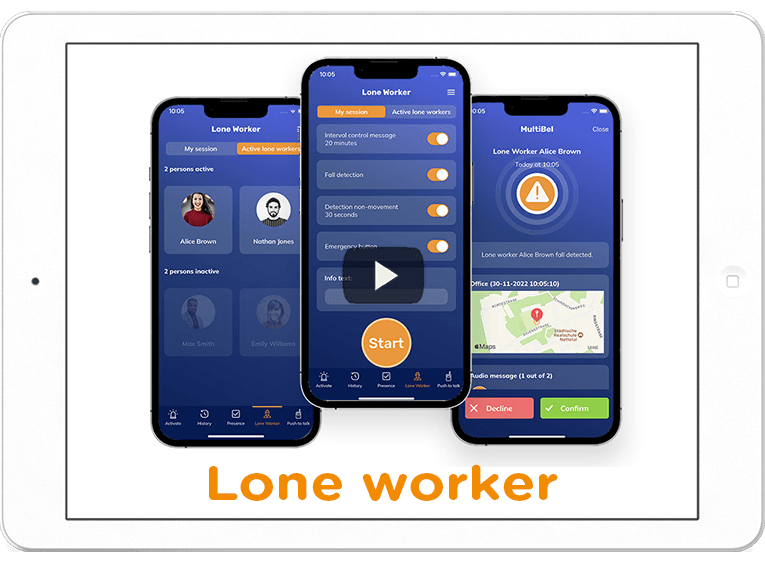
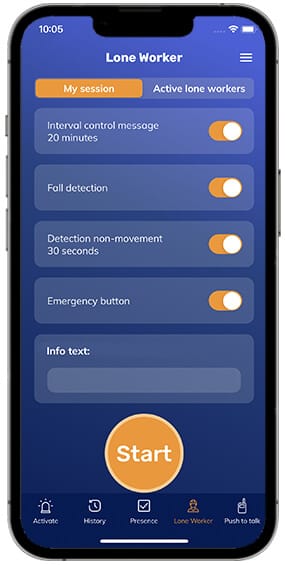
The smartphone app offers four forms of protection: fall detection, no-motion detection, (duress) alarm activation via an (external) emergency button, and check-in intervals. Thanks to accurate indoor and outdoor location tracking and, when required, escalation to our alarm monitoring centre, help is always close at hand. With solutions for all risk categories, MultiBel protects lone workers without the need for additional hardware.

What makes MultiBel unique? First, our lone worker app is certified according to the K21023 Mobile Security certification (scope 2, 3 and 4), demonstrating proven quality, reliability, and safety. Second, the app is part of a broader safety platform that also supports emergency response alerting, evacuations, technical incident management, and crisis management. Everything is integrated into a single system, allowing you to choose exactly the modules needed for your ideal safety solution.

MultiBel is trusted by municipalities, industrial organisations, healthcare institutions, offices, and nearly half of all hospitals in the Netherlands.

Three pillars – one platform
emergency notification system

Alarm

Always the right message to the right people.

Lone worker protection

Protect

Protect your people, anywhere, against anything.

Critical Event Management

Critical Event Management

Understand what’s happening, respond instantly, and focus on what matters.

Variants of lone worker protection
lone worker Alarm button

Discreet SOS button for duress alarms

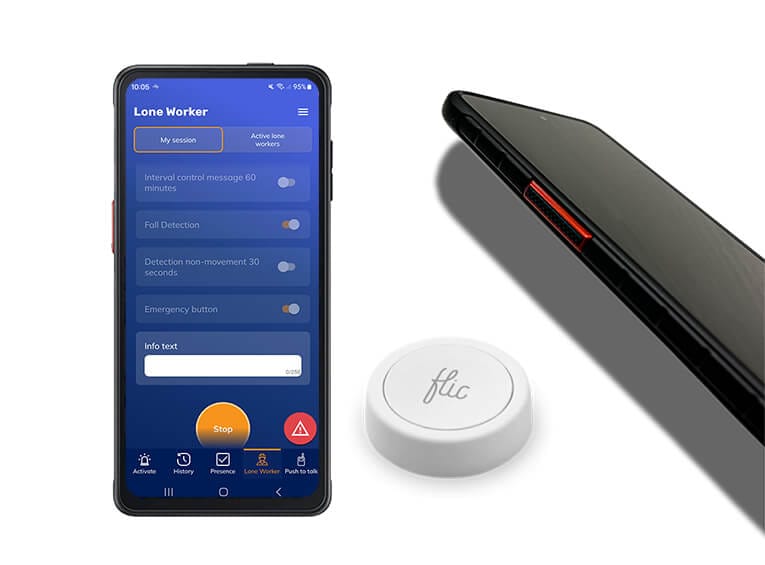
If your lone workers are at risk of encountering aggression or threatening situations, our lone worker app enables them to activate an SOS alarm discreetly. This can be done through the app itself, via an external emergency button that can be worn in various ways, or by using a dedicated button on supported smartphones such as the Samsung XCover, Ascom Myco, or Spectralink devices.

Colleagues or an alarm monitoring centre are immediately alerted and receive the lone worker’s location. They can also listen in live and, if required, establish a two-way voice connection to assess the situation and coordinate an appropriate response.

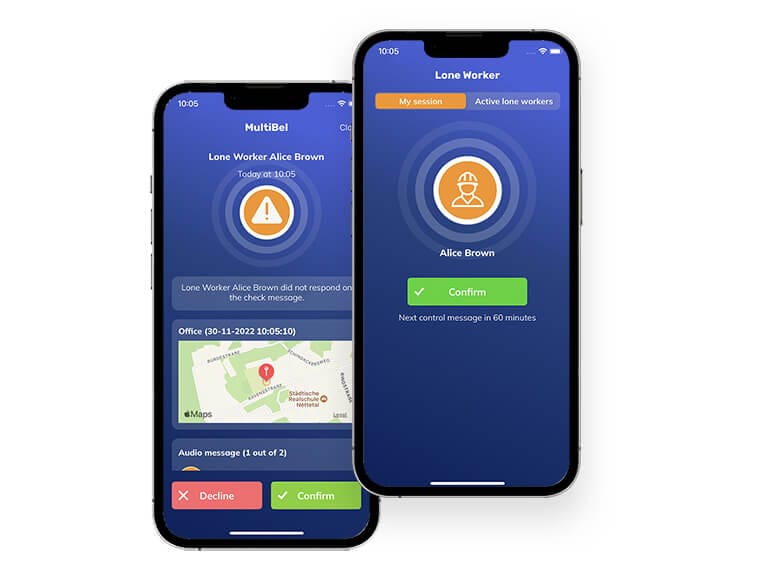
Lone worker app checks with a time interval

For some lone workers, regular check-in messages provide sufficient protection, often replacing manual security patrol checks. Based on your Risk Assessment (RI&E), employees can receive periodic check-in requests through the lone worker app. As an additional safeguard, notifications can also be backed up by a phone call.

The check-in interval can be configured according to your requirements and can vary by location, time of day, or risk level. If the lone worker fails to respond, an alert is automatically escalated to colleagues or an alarm monitoring centre, in line with your predefined procedures.

Lone worker-check message
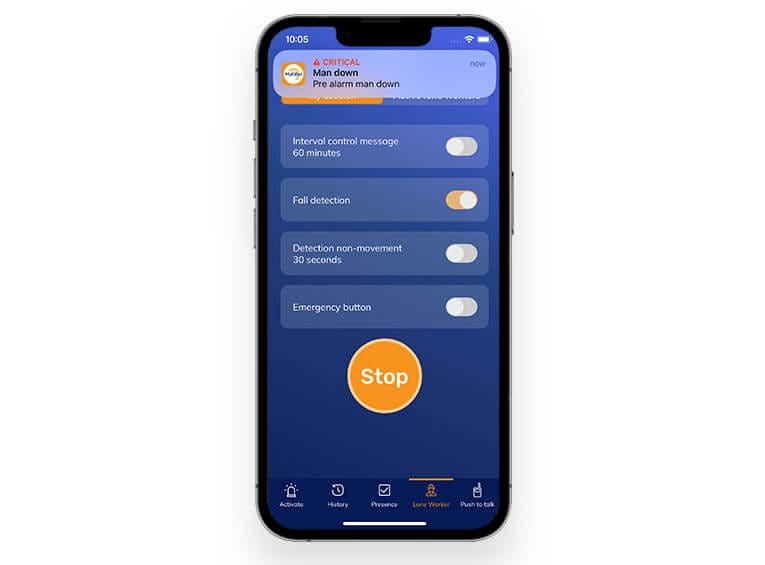
man down motion detection app

Fall detection & no-movement detection

Our lone worker app features advanced fall detection and no-movement detection, comparable to traditional lone worker devices. When the smartphone’s sensors register a fall that exceeds a predefined threshold, an alarm is automatically triggered, including the lone worker’s location. The same applies when a worker remains motionless for a predefined period of time (no-movement).

To prevent unnecessary alerts, the user is first given the opportunity to manually cancel the alarm. If no response is received, the alarm is automatically escalated to colleagues or an alarm monitoring centre.

Fall detection & no-movement detection

MultiBel offers the right solution for every situation. While many organisations choose a smartphone-based lone worker solution, some prefer a dedicated device that operates completely independently of a smartphone.

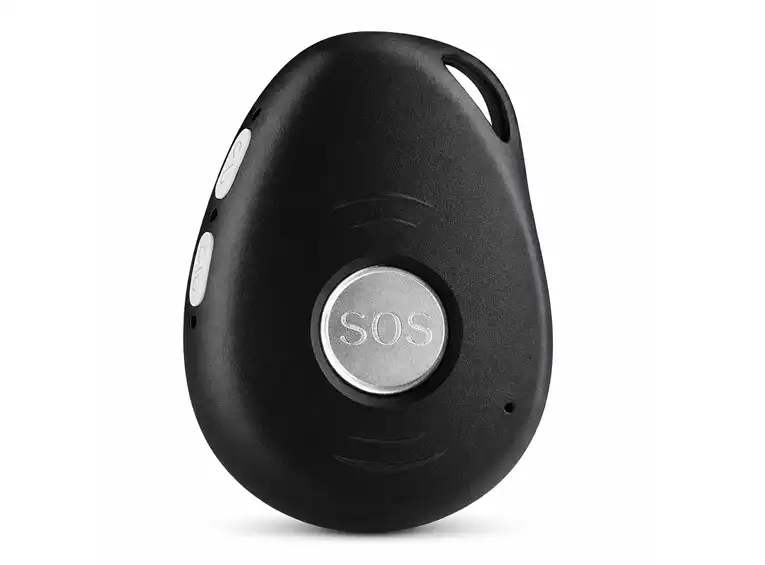
For these situations, we offer a range of dedicated devices, including a 4G alarm button. This simple and reliable device can be worn on a belt or lanyard and provides immediate access to assistance. With the press of a button, colleagues or an alarm monitoring centre are alerted and can take action immediately.

mobile 4G duress button

A quick overview of MultiBel for lone worker protection

What is MultiBel?

Start now – this 1.5-minute video.
If you want to know more, book a demo.

Our lone worker app in detail
Lone worker-panic button

Indoor and outdoor positioning

When a lone worker is in distress, a rapid response is essential. Colleagues or the alarm monitoring centre need to know the worker’s exact location immediately. Outdoors, GPS provides accurate positioning within a few metres. Indoors, however, GPS often falls short, especially in multi-storey buildings.

MultiBel solves this challenge with its revolutionary AI-Positioning System (AI-PS): highly accurate indoor positioning down to floor and room level, without the need for beacons or additional infrastructure.

Faster help for lone workers through attendance registration

MultiBel is a safety platform for a wide range of applications. Our attendance registration feature is widely used for emergency response alerting and lone worker protection. Thanks to real-time attendance information, colleagues in the immediate vicinity can be alerted and provide assistance without delay.

If there is an insufficient number of responders available, designated personnel are automatically notified. When no colleagues are available or nearby, MultiBel can automatically forward the alert to our alarm monitoring centre. This ensures that every incident receives an appropriate response and that help is always close at hand.

attendance registration
active lone worker

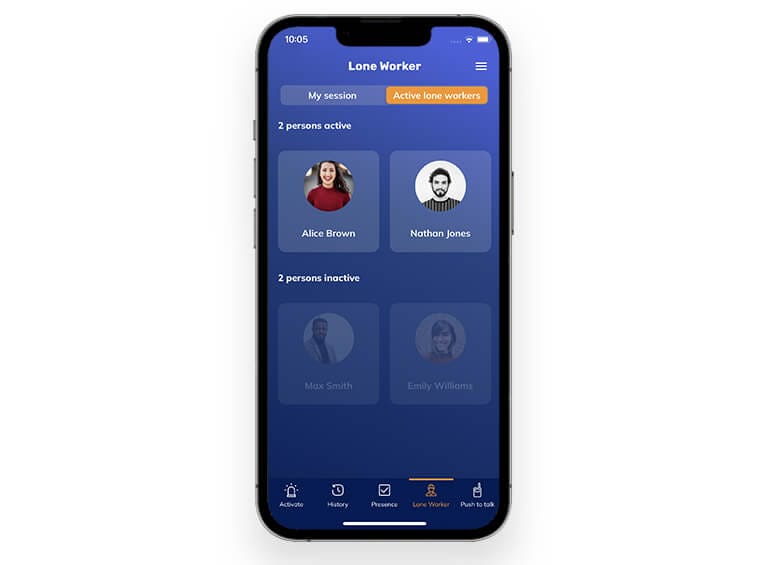
Overview of active lone workers

As an administrator, you can see which employees are currently protected by the lone worker solution. In addition, comprehensive reporting and analytics provide insight into how the system is being used.

Using historical data, you can identify employees who regularly forget to activate the app. This allows you to provide additional training or guidance, or alternatively configure the solution to start protection automatically, ensuring workers remain protected at all times.

Communication accelerates emergency response

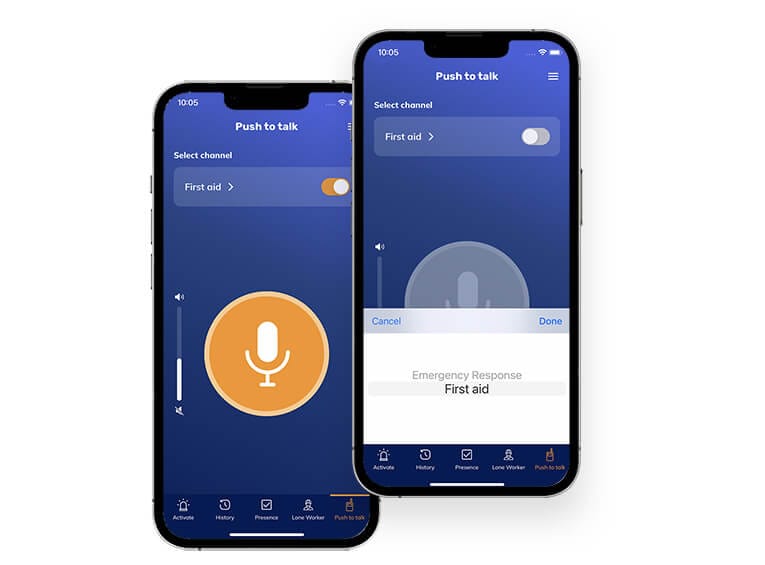
MultiBel includes an integrated communication module featuring a push-to-talk (PTT) app and telephone conference calling. When a lone worker requires assistance, responders can coordinate their actions directly within the same app, without the need for additional hardware.

By combining lone worker protection, communication, and incident response in a single platform, all safety-related functions can be accessed from the same smartphone.

lone worker push to talk app
pre alert

Prevent false alerts

False alarms can significantly reduce user confidence and acceptance of a lone worker solution. To minimise unnecessary alerts, MultiBel uses a pre-alarm mechanism that gives the lone worker time to cancel an alarm before it is escalated.

Another option is to configure the alarm button so that it requires a double press before an alarm is activated. These measures help prevent accidental activations while ensuring that genuine emergencies receive an immediate response.

Lone worker protection (LWP) with five-fold certainty

Our lone worker app is part of a certified emergency notification system that uses many different channels. The way in which colleagues can be reached differs per person but also per moment. The more channels used, the greater chance that the lone worker in need will receive help quickly.

Lone worker app

Telephone

Email

SMS

Desktop

MultiBel alerts colleagues through the lone worker app, including interruption of the silent mode. If there is no response, the person will be called on a maximum of 10 telephone numbers per person, we will send an email, SMS and can also alert computers (desktops and laptops). Until enough people have confirmed that they are responding to the colleague in need.

3.000+

Customers

30+

years of experience

150.000+

user base

Every 0,8

minutes an alert

Choose the right package for you

Send alerts for FREE with MultiBel Standard or choose MultiBel Professional.

Sales contact

Contact us for more information or a demo.

    Maikel Wijman,

    Sales Consultant

    Municipality Schagen: A. van Egmond

    We use MultiBel for the Emergency Response Team and the Crisis Team. The system can be armed by pressing an emergency button, by activating the fire alarm, or by reporting a calamity at the reception.

    Municipality Tholen: J.C.A. Moerings

    The delivery of MultiBel went well. A clear explanation has been given on site and the system has been delivered in good working order. The people who are called up have independently installed the app using the manual. If necessary, the Helpdesk is easily accessible.

    K. Hedke

    As a safety engineer, I can highly recommend the Multibel system, as it is suitable for a large number of areas of application. These range from the safe organization of the lone workplace, to first aid and fire protection to building services. Thanks to the flexible modular system, every company can find this across all industries individually fitting product. The users like the uncomplicated and well-functioning technology. If necessary, support from the competent and friendly staff is guaranteed at all times!

    Anonymous

    After acute problems with our old man-down alarm, I found Multibel. Due to Multibel's quick response, a new man-down system was quickly made available to me. After some further research, it turned out that Multibel offered solutions to various problems related to the existing alarm process. Flexible, user-friendly and clear are the key words that characterize Multibel.

    Municipality Den Helder: M. Bakker and R. Wierda

    MultiBel still meets our expectations, a good product with good support and good implementation. Elements such as the test modes indicate that the application of the product and its users has been carefully considered.

    Marel Poultry B.V.

    We are currently conducting a pilot with MultiBel's extensive alarm system. In our organization, reliability is very important in the field of safety. To this end, we want to offer the right care and attention in the right place in the event of calamities. So far MultiBel has been able to fulfill this wish very well. We were well guided in the preliminary phase and the support team is also available at all times for questions during this pilot phase. The accessibility is also great! That is service that makes us happy.

    DKMS Life Science Lab gGmbH: T. Waidt

    The excellent user-friendliness and stability of the MultiBel app has also significantly improved acceptance among our employees.

    OVER-gemeenten: E. van der Spek

    The emergency buttons in the meeting rooms give colleagues a sense of security, knowing they are never truly alone.

    BRUGG Rohrsystem AG: F. Königs

    With MultiBel, we know our lone workers are fully protected.

    Municipality Beverwijk: M. Stoyanova

    A reliable alerting system is essential for an effective response. MultiBel gives us the confidence and assurance we need.

    Mobile alarm button

    We regularly link alarm buttons that organizations already use and where they want to improve the follow-up of an emergency. There are many different mobile alarm buttons on the market. They differ in price, quality, durability and mounting options. If the customers have nothing yet, the Flic emergency button is often chosen.

    Flic MultiBel alarm
    Lone worker

    What should you pay attention to in a lone worker app?

    There are various solutions on the market to improve the safety of your employees. Are you going for a system on the smartphone or for an extra hardware device? We give you 6 tips that you should take into account when purchasing a lone worker solution.

    Working with a lone worker app or an extra device?

    Our lone worker app offers the same security as traditional lone worker hardware, but with more functionalities, more ease of use and at a lower cost. The lone worker app has the K21023 Mobile Security certification (scope 2, 3 and 4), so you as an employer are assured that the safety of your employees is guaranteed.

    man down app

    Lone worker protection & safety at work – what are the obligations?

    What is a lone worker?

    If you work in hazardous conditions and/or in a location where there is no direct supervision by a colleague, you need protection. As an employer, you are responsible under health and safety legislation for providing your employees with a safe working environment and identifying potential risks. This can also apply to people who work alone from home.

    The measures you put in place should ensure that employees can raise an alarm in an emergency, or that an alarm is triggered automatically through fall detection or a man-down alert. At precisely these moments, a reliable lone worker alarm is essential for reporting incidents and ensuring a rapid response. Our solutions are suitable for all risk categories and are designed to provide a high level of reliability.

    Technology improves lone worker protection

    In the past, organisations often relied on periodic checks by colleagues carrying out patrols or on dedicated lone worker devices. Modern technology offers more efficient ways to protect lone workers. For example, if a risk assessment determines that periodic check-ins provide sufficient protection, the lone worker can receive a notification every two hours. If no response is received, our lone worker app will typically alert nearby colleagues, meaning that in many cases an Alarm Receiving Centre is not required.

    Our lone worker app detects falls and prolonged periods of inactivity, provides an emergency alarm button, and sends the location of the lone worker in the event of an emergency. Because MultiBel knows which responders and colleagues are present at a specific location through its attendance registration system, valuable time is not lost.

    Alarm Receiving Centre or colleagues

    Would you prefer to use an Alarm Receiving Centre rather than relying on nearby colleagues? For each scenario or job role, you can decide in advance who should be alerted, who has visibility of the responses, and who is able to establish a two-way voice connection with the lone worker.

    No investment in additional hardware

    Organisations are increasingly choosing our lone worker app because it does not require any investment in dedicated hardware. In addition to the extra functionality and ease of use, it is also a far more cost-effective solution than purchasing and managing separate lone worker devices.